
Cloud agents can take on work in parallel and run inside the products people use. As teams build more of them, they need infrastructure that can give each agent a place to work without allocating a large machine for its entire task.
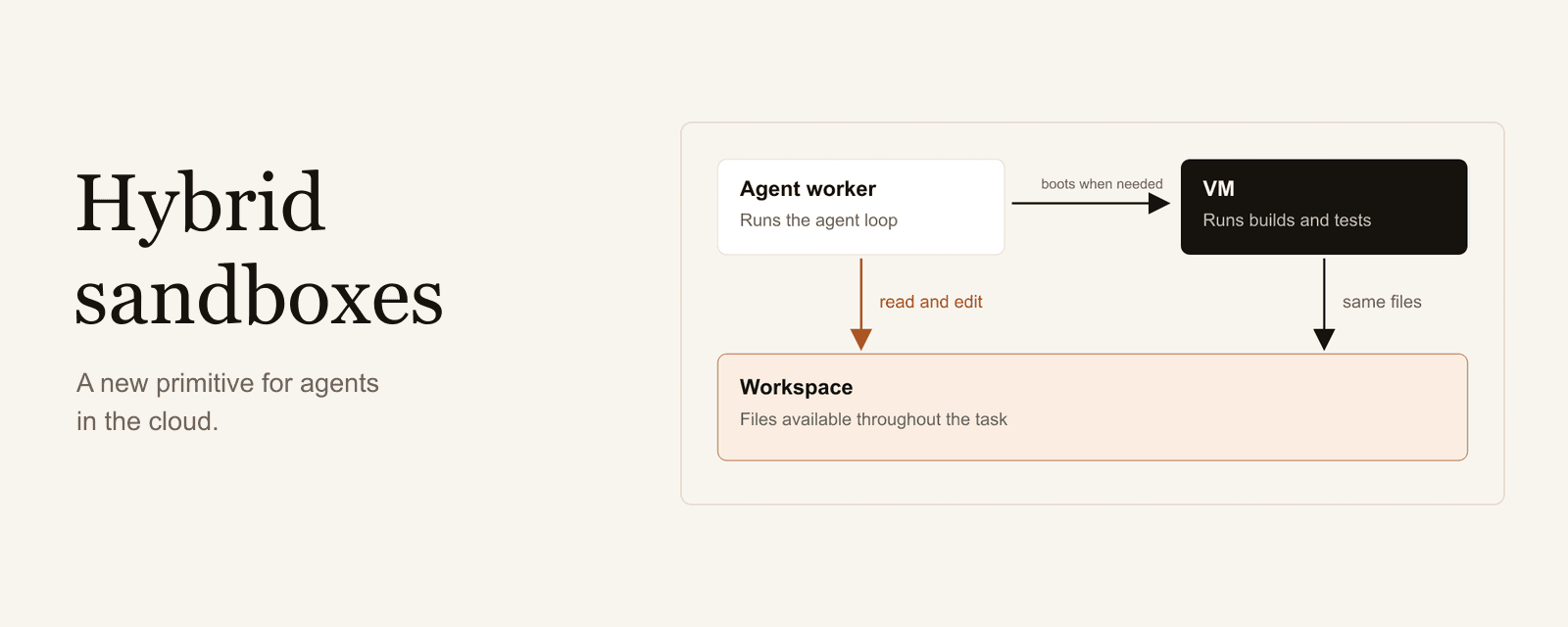
We built hybrid sandboxes around the changing compute needs of an agent. A small agent worker calls models and works with a workspace. When the agent needs to run a build, test, or other command that needs execution, it can attach a full virtual machine to those same files.
The machine can stop when the command work is done, while the workspace remains available. That gives developers a way to run agents at scale with compute matched to the work they are doing.
Compute for cloud agents
Cloud agents are becoming part of how people build products and get work done. A team can delegate tasks to agents that keep working in the cloud, and a software company can offer agents to its own customers as part of its product.
As those products grow, one agent becomes many. Each needs a place to work with its own files and tools, and the ability to run code when the task calls for it. The infrastructure needs to support that parallel work without forcing the product team to manage a separate machine for every agent by hand.
A sandbox provides an isolated environment for an agent to work in. The question we kept coming back to was how that environment should use compute as the number of agents grows.
Examining the current sandboxes
An agent's task might begin with a model call, a search through files, and an edit. Those steps need a running agent and access to files. They do not require a full VM with a disk dedicated to the task.
Then the agent needs to run a test suite, install a dependency, or execute a shell command. Now it needs a machine. The amount of compute it needs can be very different from what it needed while waiting for the model.
Giving every agent a large machine for its entire task means paying for that capacity while the agent is doing much lighter work. Multiply that across agents serving many customers and the cost of idle capacity becomes part of the product's economics. We built hybrid sandboxes to let the environment change with the work.
Introducing hybrid sandboxes
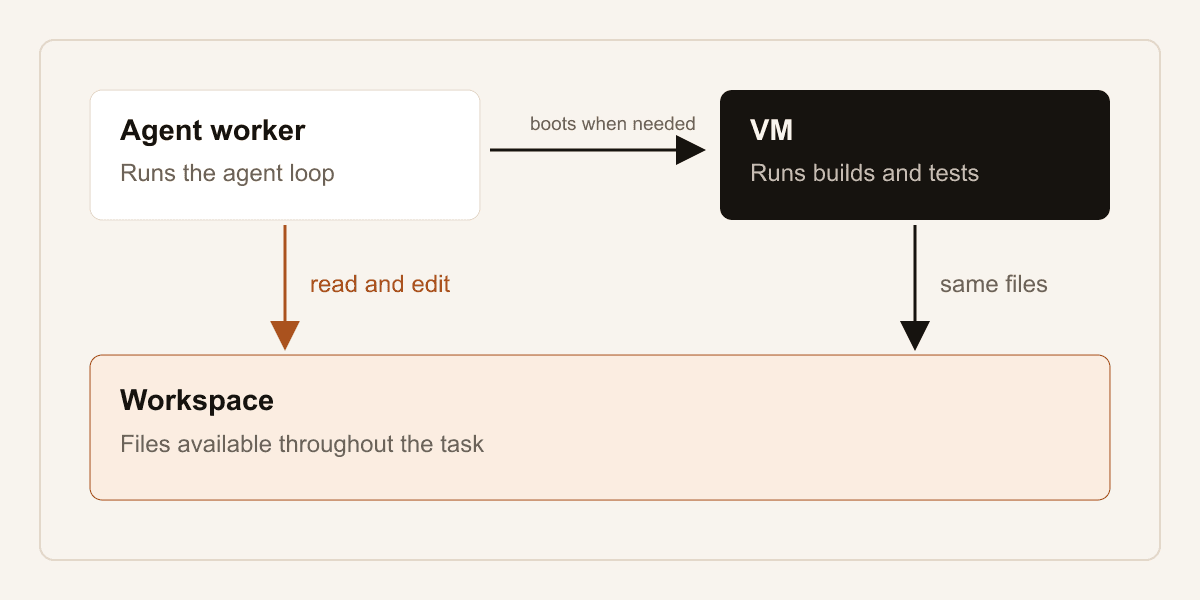
A hybrid sandbox separates the workspace containing the files from the machine that runs commands. File operations and supported read-only commands can be answered from the workspace without starting the sandbox's machine.
An agent worker runs the agent loop in a small sandbox. It can create a child sandbox and read or edit files in that child's workspace. When the agent needs to execute a command, floo attaches a virtual machine to the child sandbox. The machine sees the workspace, runs the command, and returns changes to the workspace when it stops.
Imagine a product that gives each customer an agent to work on a software project. One agent reads source files and writes a change in its workspace. When it runs the test suite, floo attaches a machine to that workspace. After the command finishes and the machine becomes idle, it can stop. The agent can inspect the resulting files and continue working.
The agent worker stays small for the agent loop. The child machine can be sized for the build or test. Each agent gets a workspace and access to a machine when its work calls for one.
A new child sandbox starts as a workspace over its image. File reads and writes go to that workspace. floo can also answer a defined set of read-only commands from it, including cat, ls, grep, and find. Commands the workspace cannot answer run on the machine.
When a command needs the machine, floo attaches a VM and puts pending workspace changes on its disk. While it is attached, the machine's disk is the source of truth for file operations. After command activity stops, floo keeps the machine warm for a configurable period, 30 seconds by default. When it stops, its disk changes return to the workspace. Persistent sandboxes can instead pause with memory and processes preserved.
Outcomes
In our research, we found that machine costs decreased by 65% on coding tasks. We will share more of that research and what we learned in future posts.
The impact depends on how an agent spends its time. A task with more file work and model calls gives the larger machine more opportunity to stop. A task dominated by long builds uses it for more of the run.
Here is an illustrative example of the compute cost.
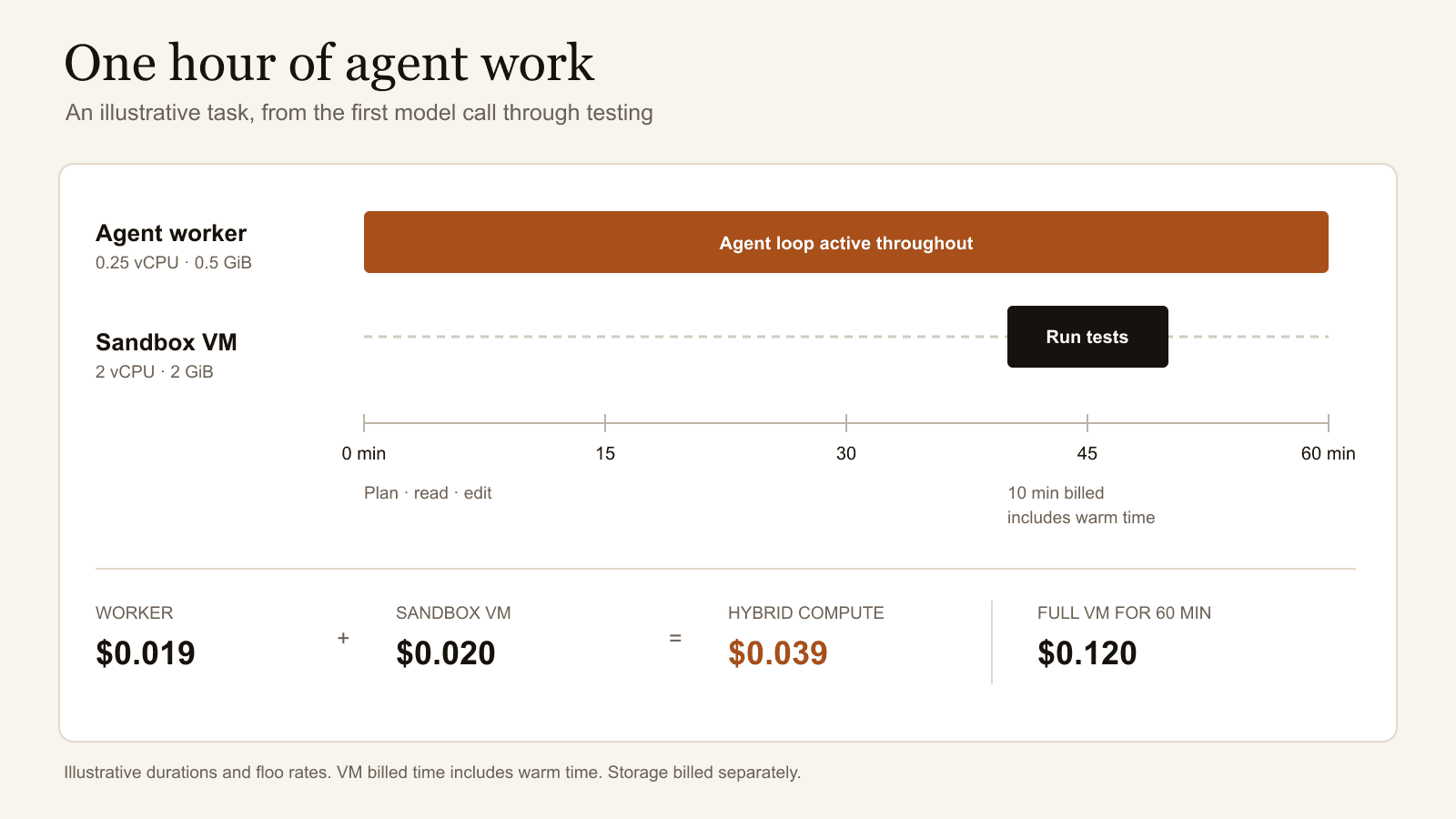
Consider an illustrative one-hour task. The agent worker runs for the hour with 0.25 vCPU and 0.5 GiB of memory. A child VM with 2 vCPU and 2 GiB runs for 10 billed minutes, including its warm time. At floo's listed sandbox compute rates of $0.045 per vCPU-hour and $0.015 per GiB-hour, the worker costs about $0.019 and the VM costs $0.020, for about $0.039 in compute.
A 2 vCPU, 2 GiB machine running for the full hour at those same rates would cost $0.120. This example assumes the stated resource use and durations. Workspace storage is billed separately, and actual CPU charges depend on the higher of requested and used CPU, up to the machine's limit.
Get started
Get started with floo to build with hybrid sandboxes. We will share more about the architecture and our research in the next posts in this series.